
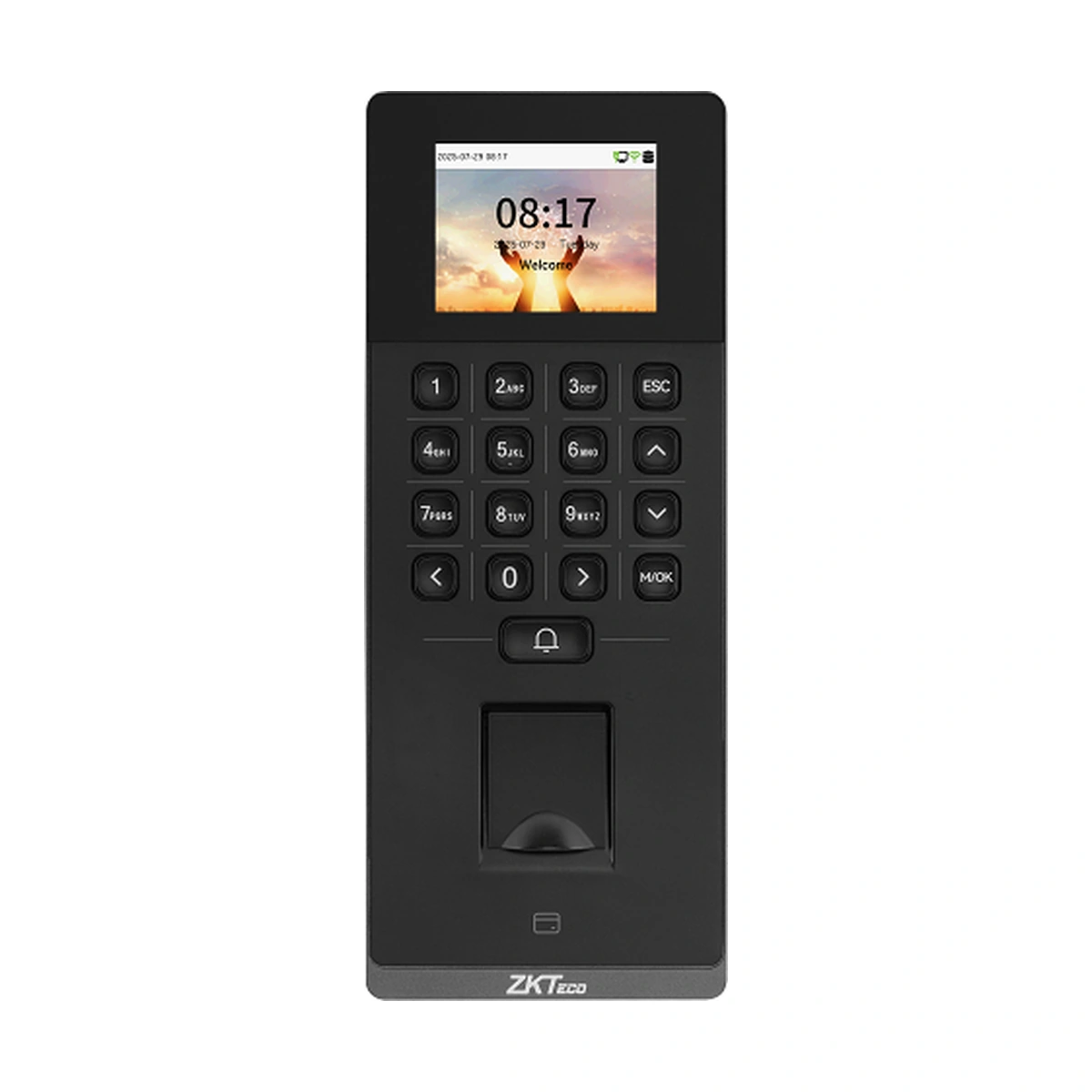
ZKTeco Access Control Terminal F34 Lite
ZKTeco F34 Lite fingerprint, card and PIN access terminal. Review 3,000-record credential limits, software modes and optional Wi-Fi, card modules and PoE.
Price on request
Contact us for current availability and lead time.
Request pricing, availability and the right configuration for your project.
Overview
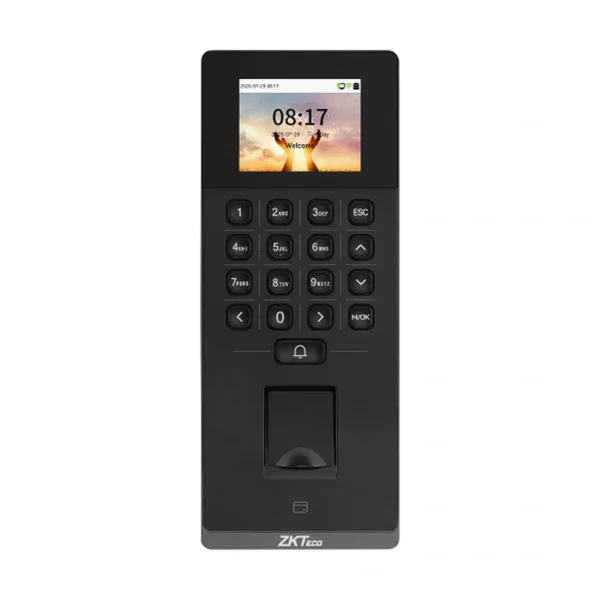
The ZKTeco F34 Lite is a standalone fingerprint, card and password access terminal with a 2.4-inch colour screen and a 17-key physical keypad. Its optical fingerprint sensor runs ZKFingerprint V13.0 as standard, with V10.0 listed as an alternative. This is the Lite credential terminal: the full F34 model’s video-intercom and optional QR-camera hardware should not be inferred from the shared family name.
The manufacturer lists 3,000 users, 3,000 cards, 3,000 fingerprint templates and 200,000 stored transactions. Each capacity describes a different record type. A published fingerprint matching time below half a second characterises the verification step, while the complete door workflow also depends on how the lock and access policy are configured. The terminal uses a Linux platform and provides a local interface for managing the documented access functions.
TCP/IP supports a wired network connection, with Wiegand input or output and ZKTeco RS485 for the relevant reader arrangement. Electric-lock, door-sensor, exit-button and alarm connections allow it to form part of a designed door system. Its IP65-rated enclosure and specified operating range of minus 10 to 55 degrees Celsius help assess the proposed mounting location. On-premise software is matched by protocol: ZKBio CVAccess uses AC PUSH and ZKBio Time uses TA PUSH, with ZKBio Zlink also listed for the cloud arrangement. Choose the host workflow and terminal configuration together.
Applications & Use Cases
- Local access-policy management: Access levels, groups, holidays and anti-passback are documented functions for organising entry rules. The scheduled-bell function can add a timed prompt at the access point, separate from whether a person’s credential is authorised.
Product FAQs
Does the Lite model include Wi-Fi as standard?
No. The manufacturer labels 2.4 GHz Wi-Fi optional, including AP-mode support. Choose the fitted radio option when wireless networking is required; ordinary TCP/IP support does not establish a radio is installed.
Can the standard ID reader use a DESFire credential?
The standard module is 125 kHz ID. IC at 13.56 MHz and an ID/IC/DESFire EV1/EV2 multi-tech module are optional. Match the actual card technology and module; a card’s physical size does not establish readability.
Which power arrangement applies if PoE is required?
The ordinary input is DC 12 V, 1.5 A. IEEE 802.3at PoE is an optional configuration. Ensure the terminal option and network power source match before specifying a single network-cable installation.
Can the USB socket act as a general-purpose peripheral port?
The Type-A port is explicitly specified for a USB drive only. Support for an external scanner, printer or other USB peripheral is not established by that port.
Can existing long personnel IDs be retained?
The manufacturer lists user IDs up to 14 digits. Map the existing personnel identifiers to the applicable software and terminal format rather than shortening them merely because the local password field accepts six to eight digits; the two fields serve different purposes.
Specifications
| Manufacturer | ZKTeco |
|---|---|
| Model | F34 Lite |
| Manufacturer part number | AC01-F34H-16 |
| Display | 2.4"@ TFT Color LCD Screen (240 * 320) |
| Operation System | Linux |
| Hardware | CPU: Dual Core@1.0GHz RAM: 128MB; ROM: 256MB Speaker: 8ohm±15% @1.0W Physical Keypad: 17 Keys Fingerprint Sensor: ZK Optical Sensor |
| Authentication Method | Fingerprint / Card / Password (Physical Keypad) |
| Fingerprint Template Capacity | 3,000 (1: N) |
| Card Capacity | 3,000 (1: N) |
| User Capacity | 3,000 (1: N) |
| Transaction Capacity | 200,000 |
| User Password Length | 6 - 8 digits |
| Biometric Authentication Speed | less than 0.5 sec (Fingerprint) |
| False Acceptance Rate (FAR) % | FAR ≤ 0.0001% ( Fingerprint; ZKFingerprint V10.0; ZKFingerprint V13.0) |
| False Rejection Rate (FRR) % | FRR ≤ 0.01% ( Fingerprint; ZKFingerprint V10.0; ZKFingerprint V13.0) |
| Biometric Algorithm | ZKFingerprint V13.0 (Standard) / V10.0 (Optional) |
| Card Type | ID Card @ 125 kHz (Standard) IC Card @ 13.56 MHz (Optional) Optional Multi-Tech Module: Module1: ID & IC & DESFire EV1 / EV2; (125 kHz & 13.56 MHz Dual Frequency) |
| Communication | TCP/IP*1 Wi-Fi (IEEE802.11b/g/n/ax) @ 2.4 GHz (Optional) Wiegand (Input or Output)*1 RS485: ZKTeco RS485*1 USB: Type A (USB Drive Only)*1 Aux Inputs*1, Electric Lock *1, Door Sensor*1, Exit Button*1, Alarm*1, Doorbell*1, 12V Output*1 |
| Standard Functions | Webserver, ADMS, DST, Up to 14-digit User ID, Access Levels, Groups, Holidays, Anti-Passback, Record Query, Schedule Bell, Tamper Switch Alarm, Automatic Status Switch (Effective only under T&A rules), Multiple Verification Methods, AC PUSH and TA PUSH Protocol Switch, HTTPS / SSH Backend Access, T9 Keyboard (Input), SRB, Doorbell |
| Optional Functions | Wi-Fi (AP Mode), PoE, Wireless Doorbell |
| Access Control Interface | RS485 (RS485 Card Reader / Biometric Reader) |
| Operating Temperature | -10°C to 55°C |
| Power Supply | DC 12V 1.5A PoE: IEEE 802.3at (Optional) |
| Operating Humidity | 10% to 90% RH (Non-condensing) |
| Dimensions | 205.7mm * 82.7mm * 33mm (L * W * H) |
| Gross Weight | 0.76 Kg |
| Net Weight | 0.42 Kg |
| Supported Software | On-Premise Software: ZKBio CVAccess (AC PUSH) / ZKBio Time (TA PUSH) Cloud-based Software: ZKBio Zlink by default (Supports Web Portal & Mobile App) |
| Installation | Wall-mount (Compatible with Asian Gang Box / Single Gang Box), compatible with Rots-3 Stand / Rots-02 Bracket |
| Ingress Protection Rating | IP65 (waterproof and dustproof ) |
| Certifications | ISO14001, ISO9001, CE, FCC, RoHS |
Downloads
Manufacturer documents and Royal Link product sheets. Check the publisher and configuration notes for each file. PDFs open in a new tab.
| Document | Type | Size | Updated / version | Action |
|---|---|---|---|---|
| PDFF34 Lite Datasheet 20251202ZKTecoManufacturer family reference; supplied configuration may vary. | Datasheet | 4.42 MB | — | Download ↗ |
| PDFZK F34 Lite User Manual 20251203ZKTecoManufacturer family reference; supplied configuration may vary. | User manual | 8.30 MB | — | Download ↗ |
| PDFZK F34 Lite Quick Start Guide 20251202ZKTecoManufacturer family reference; supplied configuration may vary. | Quick start guide | 3.76 MB | — | Download ↗ |
| PDFF34 Lite - Royal Link product sheetRoyal Link Technologies LtdSupplier catalogue specifications | Product sheet | 162 KB | 2026-10-30 | Download ↗ |
Manufacturer references
Customer reviews
Your experience helps others choose the right solution.
You may also like
Explore more from this product range.
Reviews
No reviews yet
Be the first to share your experience with this product.