
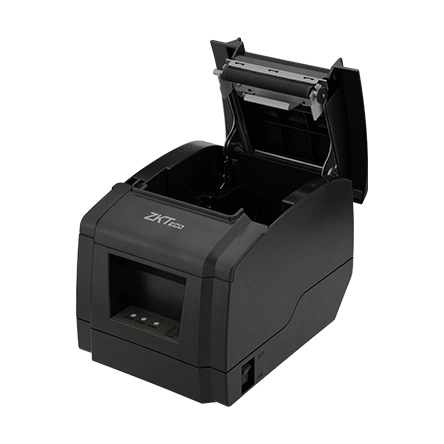
ZKTeco Thermal Printer ZKP8005
ZKTeco ZKP8005 USB/LAN ESC/POS thermal printer with partial cutter. Review receipt layout, 24 V drawer output and documented self-test/maintenance controls.
Price on request
Contact us for current availability and lead time.
Request pricing, availability and the right configuration for your project.
Overview
The ZKTeco ZKP8005 is a desktop direct-thermal receipt printer with USB and LAN connections and an automatic partial cutter. It is intended to receive receipt data from a compatible POS application using the documented ESC/POS command approach. The exact September 2022 datasheet rates printing at 230 millimetres per second. That paper speed does not establish how many complete transactions an application can finish per minute.
The printer uses 79.5 ± 0.5 millimetre thermal paper and a 72 millimetre printing width. Its character settings support alternative font sizes, command-adjustable line spacing and 42- or 48-column Font A layouts. The listed one-dimensional barcode formats can be generated as part of the receipt design. Select the application’s output format and character encoding together, rather than assuming every receipt template will retain its existing spacing.
A 24 V, 2.5 A input and separate 24 V, 1 A cash-drawer output define the electrical profile. The body measures 192 by 145 by 133 millimetres and has a one-kilogram listed net weight. The manufacturer gives a 100-kilometre print-head rating and 1.5-million-cut cutter rating; these are component ratings rather than supplier warranty terms. The installation needs stable placement, the specified power source and access to the paper cover. USB plus LAN does not establish an included wireless connection.
Applications & Use Cases
- Wall-mounted receipt station: The exact manual and datasheet identify wall mounting with a hidden cable slot. It offers an alternative to counter placement where the actual fixings, cable route and paper-cover access suit the installation; an included mounting kit is not established.
Product FAQs
How can the printer be checked independently of the POS application?
The exact manual describes a self-test: with power connected, start from off, hold FEED while switching on and release after about two seconds. It prints the printer settings. The longer button holds select other modes, so follow the self-test timing.
What should be checked when the alarm flashes?
The manual associates the alarm with paper shortage, a cutter error or print-head overheating. Check the indicated condition before treating the alarm as a network or software failure; the power light alone does not prove the print mechanism is ready.
Should a cover jam be opened by force?
No. The exact manual warns that forcing the cover can damage the head and cutter. It describes restarting to return the cutter and a specified cutter-gear recovery procedure if required. Use the matching mechanism procedure rather than pulling the cover open.
How should a hot or dirty print head be cleaned?
Switch off, remove the roll and let the head cool. The manual describes careful cleaning of the thermal elements with alcohol-moistened cotton and waiting for the solvent to evaporate before closing and running a self-test. Do not scratch the head, roller or sensors.
Does a successful driver installation automatically select the correct printer connection?
The manual’s Windows setup distinguishes the default-printer choice and the port selection; USB skips the manual port-selection step. The driver’s selected connection must match the actual printer port and application setup.
Specifications
| Manufacturer | ZKTeco |
|---|---|
| Model | ZKP8005 |
| Print Method | Direct thermal |
| Paper Width | 79.5±0.5mm |
| Print Speed | 230 mm/s |
| Print Width | 72mm |
| Character Set | Alphanumeric; International |
| Character Size | ANK Font A: 1.5×3.0mm (12×24 dots) Font B: 1.1×2.1mm (9×17 dots) |
| Print Resolution | 576 dots/line or 512 dots/line (Adjusted by command) |
| Line Spacing | 3.75mm (Adjusted by command) |
| Column Number | Font A: 42 columns or 48 columns |
| 1D Barcode Types | UPC-A / UPC-E / JAN13(EAN13) / JAN8(EAN8) / CODABAR / ITF / CODE39 /CODE93 / CODE128 |
| Extension Character Sheet | PC437(standard Europe) (Katakana) PC850(Multilingual) PC860(Portugal) PC863(Canadian) PC865(Nordic) (West Europe) (Greek) (Hebrew) (East Europe) (Iran) (WPC1252) PC866(Cyrillic#2) PC852(Latin2) (PC858) (Iran II) (Latvian) (Arabic) (PT1511251) |
| Auto Cutter | Partial |
| Interface | USB+LAN |
| Print Command | ESC/POS |
| Power Adapter | Input: AC 100-240V/50-60 Hz Output: DC24V/2.5A |
| Printer Input | DC 24V/2.5A |
| Cash Drawer | DC 24V/1A |
| Cutter Life | 1.5 million cuts |
| Printer Head Life | 100KM |
| Dimensions (D*W*H) | 192*145*133 (mm) |
| Net Weight | 1.00 Kg |
| Weight with Packaging | 2 Kg |
| Operating Temperature | 0℃ to 45℃ |
| Storage Temperature | -10℃ to 60℃ |
| Operating Humidity | 10% to 80%RH |
| Storage Humidity | 10% to 90%RH |
| Certificate | CE; FCC; RoHS |
Downloads
Manufacturer documents and Royal Link product sheets. Check the publisher and configuration notes for each file. PDFs open in a new tab.
| Document | Type | Size | Updated / version | Action |
|---|---|---|---|---|
| PDFZKP8005 Data sheet 20220929ZKTeco | Datasheet | 385 KB | 2022-09-29 | Download ↗ |
| PDFZKP8005 User manual 20220707ZKTeco | User manual | 1.52 MB | 2022-07-07 | Download ↗ |
Manufacturer references
Customer reviews
Your experience helps others choose the right solution.
You may also like
Explore more from this product range.
Reviews
No reviews yet
Be the first to share your experience with this product.