
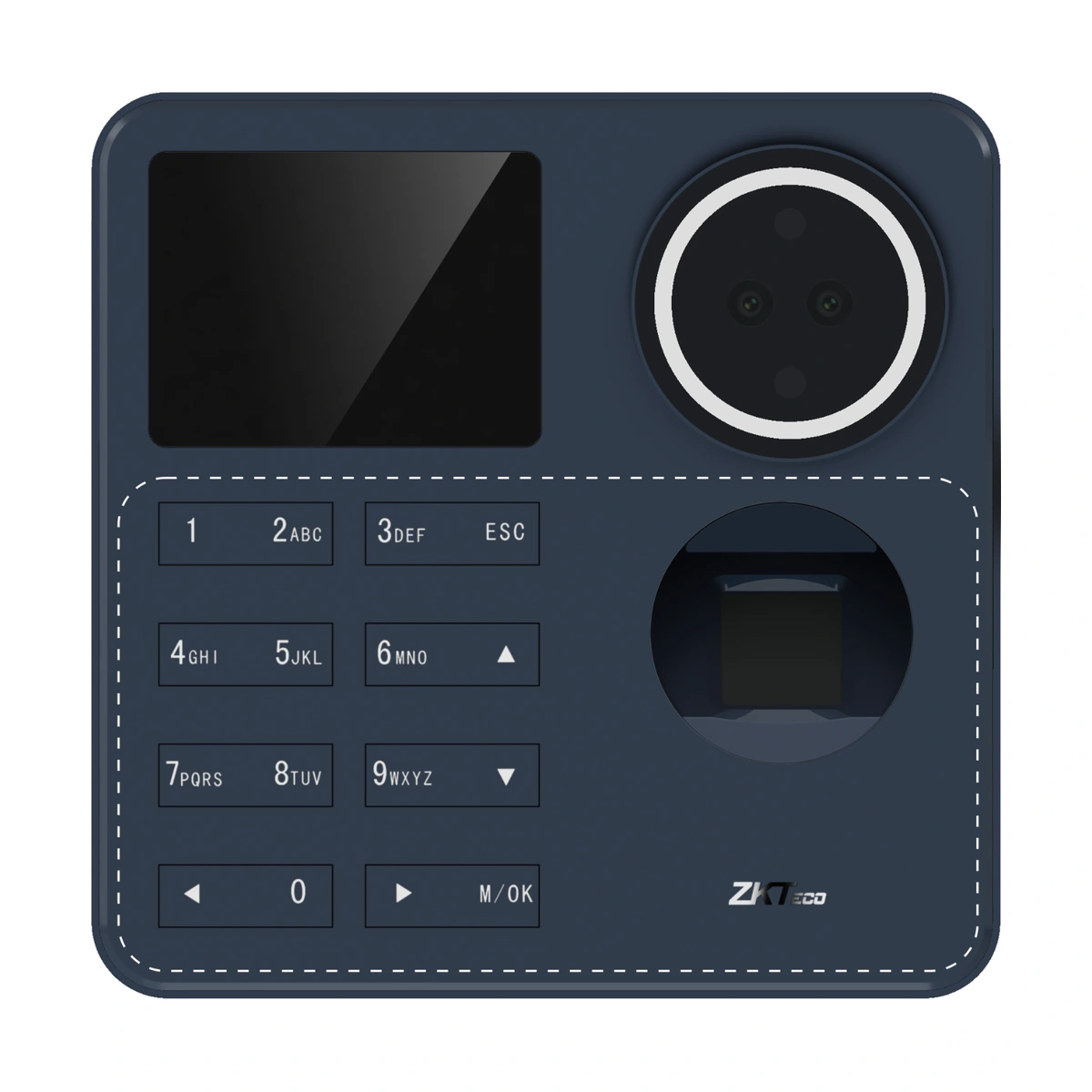
ZKTeco SenseFace T2 Time Attendance Terminal
SenseFace T2 attendance terminal with face, fingerprint and password identification. RFID and backup battery are optional; plan the supported network, software and mounting arrangement.
Price on request
Contact us for current availability and lead time.
Request pricing, availability and the right configuration for your project.
Overview
The ZKTeco SenseFace T2 is a time-attendance terminal combining facial authentication, fingerprint recognition and password entry. It gives a workplace more than one way to identify staff at the point of clocking, with RFID available as an option. Its purpose is attendance capture and management; the presence of biometric identification should not be taken as evidence of a complete door-control installation.
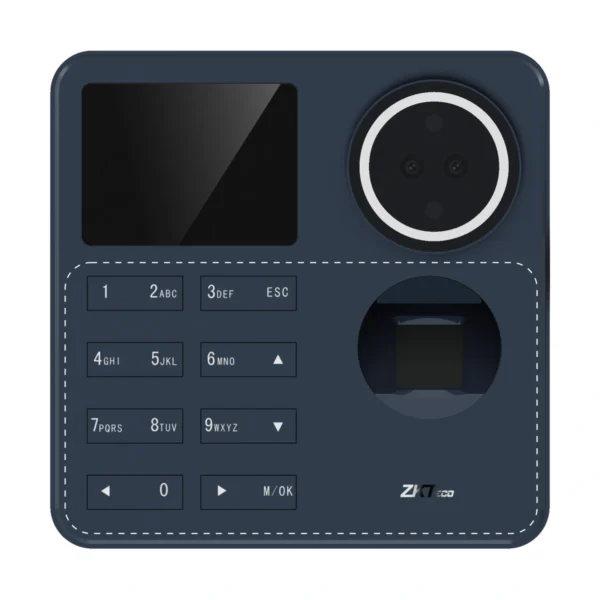
A 2.4-inch colour display provides local feedback, and the physical keypad supports password-based use. The T2 is documented with a blue enclosure and an eight-key physical keypad. The standard capacities listed for the model are 1,500 face templates, 1,500 fingerprint templates and 3,000 users, with space for 150,000 transactions. These figures describe different storage limits, so the user total does not expand the available face or fingerprint template capacity.
Wi-Fi supports communication with the documented ZKBio Zlink cloud arrangement, while ZKBio Time is listed for an on-premise TA PUSH workflow. Attendance rules and reporting must be configured in the selected software. Optional hardware includes ID or IC card capability and a backup battery; those options should be specified rather than assumed to be fitted. Wall and desktop mounting arrangements are described, with a compatible desktop stand needed for that installation choice. Select the terminal around the staff-identification method, network and software plan, and the exact card, power-backup and mounting configuration required.
Applications & Use Cases
- Multi-method staff clocking: Use face, fingerprint or password identification to collect attendance events. Configure the relevant attendance rules in the chosen supported software.
- Cloud-managed attendance: Use Wi-Fi with the documented ZKBio Zlink arrangement to administer employees and review attendance reports. The software service and network must be in place.
Product FAQs
Can I add RFID cards without checking the ordered version?
No. ID and IC card capabilities are optional; establish which reader option is fitted and which credential technology is required.
Is the USB port a direct computer-enrolment connection?
It is described as Type-A USB for a USB drive. Do not assume it is a USB peripheral connection to a computer.
Does the terminal operate a door lock as supplied?
A full door-control arrangement is not established for this attendance model. Its identification functions do not prove a lock-control interface.
Is backup power standard?
The 2,000 mAh battery is optional. The manufacturer describes up to two hours of continuous operation when that option is fitted.
Does a software name establish that a licence is included?
No. Confirm the selected software deployment, device protocol and licensing arrangement separately from the terminal hardware.
Specifications
| Manufacturer | ZKTeco |
|---|---|
| Model | SenseFace T2 |
| Manufacturer part number | TA01-VL060H-21 |
| Display | 2.4" TFT Color LCD Screen (320*240) |
| Camera | WDR Binocular Camera @ 1MP |
| Operation System | Linux |
| Hardware | CPU: Dual-Core @ 1GHz; RAM: 512MB; ROM: 8GB (Standard Version) / ROM: 512MB (Entry Version); Speaker: 8ohm @1W; Supplement Light: Yes/ Near-Infrared; Light*2; Physical Keypad: 8 Keys; Color: Blue; Fingerprint Sensor: ZK Optical Sensor |
| Authentication method | Facial / Fingerprint / Card (Optional) / Password (Physical Keypad) |
| Face Template Capacity | 1,500 (1:N) (Standard) |
| Fingerprint Template Capacity | 1,500 (1:N) (Standard) |
| Card Capacity | 3,000 (1:N) (Standard) |
| User Capacity | 3,000 (1:N) (Standard) |
| Transaction Capacity | 150,000 |
| Max. User Password Length | 8 digits |
| Biometric Authentication Speed | Less than 0.5 sec (Fingerprint), less than 0.35 sec (Facial Authentication) |
| False Acceptance Rate (FAR) % | FAR≤0.01% (Visible Light Facial Authentication), FAR ≤ 0.0001% (Fingerprint) |
| False Rejection Rate (FRR) % | FRR≤0.02% (Visible Light Facial Authentication), FRR≤0.01% (Fingerprint) |
| Biometric Algorithm | ZK Facial V4.0 (Standard), ZKFingerprint V13.0 (Standard) / V10.0 (Optional) |
| Card Type | ID Card: 125 kHz (Optional), IC Card: 13.56 MHz (Optional) |
| Communication | Wi-Fi (IEEE 802.11b/g/n/ax) @ 2.4GHz; Wi-Fi 6 Enabled USB: Type A 2.0 *1 (USB Drive Only) |
| Standard Functions | ADMS, DST, Workcode, Up to 14-digit User ID, Record Query, Schedule Bell, Automatic Status Switch / Self-Service Report (Effective only under T&A rules), Multiple Authentication Methods, HTTPS for cloud/Web access; SSH for backend maintenance; T9 Keyboard (Input), Online Firmware Upgrade, Tap-To-Unlock (ESC Button) |
| Optional Functions | ID Card, IC Card, Backup Battery |
| Power Supply | DC 5V 2A |
| Operating Temperature | -5°C to 45°C |
| Operating Humidity | 20% to 80% RH (Non-condensing) |
| Backup Battery (Optional) | 2,000mAh (Lithium Battery) Operating Hours: 2 Hours Max.Standby Hours: 3.5 Hours Estimated Charging Time: 5 Hours |
| Dimensions | 117.5 mm*116.6 mm*31.0 mm (L*W*H) |
| Gross Weight | 0.45 Kg |
| Net Weight | 0.24 Kg |
| Supported Software | Cloud-based Software: ZKBio Zlink by default (Supports Web Portal & Mobile App) On-Premise Software: ZKBio Time (TA PUSH) |
| Installation | Wall mount (Compatible with Asian Gang-Box/ Single Gang-Box) Desk mount (Compatible with Rots-4 desktop stand) |
| Certifications | ISO 9001, ISO14001, CE, FCC, Equivalent to RoHS |
Downloads
Manufacturer documents and Royal Link product sheets. Check the publisher and configuration notes for each file. PDFs open in a new tab.
| Document | Type | Size | Updated / version | Action |
|---|---|---|---|---|
| PDFSenseFace T1 & SenseFace T2 Datasheet 20260130ZKTecoManufacturer family reference; supplied configuration may vary. | Datasheet | 968 KB | — | Download ↗ |
| PDFZK SenseFace T1 & SenseFace T2 User Manual 20260130ZKTecoManufacturer family reference; supplied configuration may vary. | User manual | 5.35 MB | — | Download ↗ |
| PDFSenseFace T2 - Royal Link product sheetRoyal Link Technologies LtdSupplier catalogue specifications | Product sheet | 183 KB | 2026-10-30 | Download ↗ |
Manufacturer references
Customer reviews
Your experience helps others choose the right solution.
You may also like
Explore more from this product range.
Reviews
No reviews yet
Be the first to share your experience with this product.