
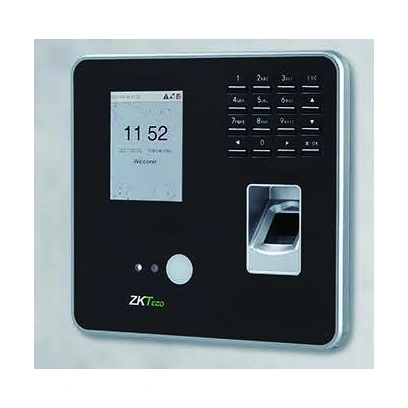
ZKTeco Time Attendance Terminal MB20-VL
MB20-VL face and fingerprint attendance terminal with optional card reading and Wi-Fi. Standard 100-face and 500-fingerprint limits; expanded capacities and cloud eligibility depend on configuration.
Price on request
Contact us for current availability and lead time.
Request pricing, availability and the right configuration for your project.
Overview
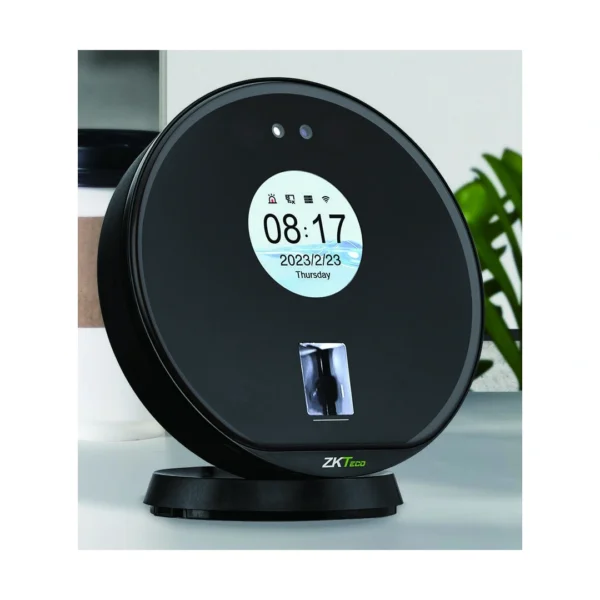
The ZKTeco MB20-VL is a face and fingerprint time-attendance terminal with visible-light facial recognition and optional card reading. Its 2.8-inch TFT screen provides the local interface, while a 1 MP binocular camera supports face capture. The documented recognition distance is 30–50 centimetres, making a clearly positioned clocking point relevant when planning how staff approach the device. It should not be treated as a camera for identifying people across a room.
The standard transaction allowance is 50,000 records, with an optional 150,000-record configuration. Event storage is separate from the enrolment limits for each authentication method. TCP/IP and USB host provide the listed communication paths, while Wi-Fi is optional. The documented functions include self-service queries, automatic status switching, daylight-saving adjustment, T9 input and built-in SSR reporting. These functions support local attendance collection and review; the organisation still needs to define its reporting rules and collection workflow.
The Linux-based terminal is wall mounted and measures 161.93 × 152.93 × 31.5 mm. Its listed operating range is 0–45°C with 20–80% humidity. Electric-lock, door-sensor and exit-button interfaces support a separately specified door installation. Select the device generation, reporting arrangement and optional hardware together, with the door components and software entitlement identified separately from the terminal itself.
Applications & Use Cases
- Scheduled clocking prompts: Use the documented bell-scheduling function to provide configured prompts at the attendance point. Define the schedule and enabled bell arrangement during commissioning; a prompt does not determine the employee’s recorded hours or payroll treatment.
Product FAQs
Can an older MB20-VL gain ZKBio Zlink support through a firmware update?
ZKTeco’s official FAQ says older MB20-VL units cannot be upgraded for ZKBio Zlink because they lack the required cloud key. The 2024 datasheet names Zlink, while the regional page also refers to the older ZKBio Access IVS attendance arrangement. Identify the hardware generation and applicable software support before selecting a cloud workflow.
Does an 800-face requirement fit the standard configuration?
No. The regional manufacturer specification lists 100 faces and 500 fingerprints as standard, with optional limits of 800. An 800-face requirement needs the applicable expanded configuration; the larger fingerprint allowance does not expand face storage automatically.
Can existing 125 kHz cards be used with any MB20-VL?
Card reading is optional. ZKTeco lists 125 kHz EM and 13.56 MHz IC configurations, so the fitted reader must match the intended credentials. A terminal ordered without the required card module is not established as compatible with the existing card fleet.
Is the supplier-listed 12V adapter option established by the regional page?
The regional manufacturer page specifies 5V, 2A; it does not establish the imported supplier row’s optional 12V arrangement. Confirm the actual unit label and its matching manufacturer instructions before connecting power. An adapter from a different attendance model should not be selected by appearance.
Does built-in SSR require a separately installed attendance program?
ZKTeco describes SSR as generating reports on the device without installing attendance software, for smaller user groups and simple shifts. The MB20-VL documentation identifies built-in SSR Excel reporting. Establish whether that reporting workflow meets the required rules; it does not establish a complete payroll integration.
Specifications
| Manufacturer | ZKTeco |
|---|---|
| Model | MB20-VL |
| OS | Linux |
| Memory | 256MB RAM/256MB Flash |
| Communication | TCP/IP, USB Host, Wi-Fi (optional) |
| Face Capacity | 100(Optional:800 ) |
| Fingerprint Capacity | 500(Optional:800) |
| Transaction Capacity | 50,000(Optional:150,000) |
| AC Adapter | 5V, 2A on regional manufacturer page; supplier 12V option not verified. Match the supplied unit label and applicable instructions. |
| Operating Temperature | 0°C- 45°C |
| Operating Humidity | 20%-80% |
| Standard Functions | ADMS, DST, Self-service Query, Automatic Status Switch, T9 Input, Camera, 9-digit User ID, Multiple Verification Methods, Bell Scheduling, SSR |
| Access Control Interface | 3rd Party Electric Lock, Door Sensor, Exit Button |
| Optional Functions | Wi-Fi , ID Card , MF Card |
| Compatibility | ZKBio Access IVS (T&A) on regional page; 2024 datasheet names ZKBio CVAccess and ZKBio Zlink. Older MB20-VL cannot gain Zlink by firmware upgrade; exact hardware generation must be matched. |
| Dimensions(W*H*D) | 161.93*152.93*31.50 (mm) Installation Wall mounted |
Downloads
Manufacturer documents and Royal Link product sheets. Check the publisher and configuration notes for each file. PDFs open in a new tab.
| Document | Type | Size | Updated / version | Action |
|---|---|---|---|---|
| PDFMB20-VL Datasheet 202406ZKTecoManufacturer family reference; supplied configuration may vary. | Datasheet | 768 KB | — | Download ↗ |
| PDFA60110031-ZK MB20-VL Installation Guide v1.0 - 20210520 148x210mmZKTecoManufacturer family reference; supplied configuration may vary. | Installation guide | 1.38 MB | — | Download ↗ |
| PDFMB20-VL - Royal Link product sheetRoyal Link Technologies LtdSupplier catalogue specifications | Product sheet | 167 KB | 2026-10-30 | Download ↗ |
Customer reviews
Your experience helps others choose the right solution.
You may also like
Explore more from this product range.
Reviews
No reviews yet
Be the first to share your experience with this product.